Learn how Retrieval-Augmented Generation (RAG) solves AI hallucinations with real-world Python examples and code. Build your first production-ready RAG pipeline today.
What you’ll learn by the end of this article: You’ll understand exactly how Retrieval-Augmented Generation works under the hood, why your current AI chatbot keeps giving wrong answers, and how to build a working RAG pipeline from scratch — complete with real Python code you can drop into your project today.
1. The Problem No One Talks About with AI Chatbots {#the-problem}
Imagine you just deployed an AI chatbot for your company’s customer support. It sounds brilliant in demos. But on day one, a customer asks: “What is your refund policy for orders placed after December 2024?”
The bot confidently replies with a policy that was updated six months ago — and doesn’t even exist anymore.
Your customer is angry. Your team is embarrassed. And your AI? It had no idea it was wrong.
This is the hallucination problem in large language models (LLMs). Models like GPT-4 or Claude are trained on data up to a certain date. They have no access to your private documents, your internal knowledge base, or anything that happened after their training cutoff. When asked about something outside their training data, they don’t say “I don’t know” — they make something up, confidently.
Retrieval-Augmented Generation was built to solve exactly this problem. And by the end of this article, you’ll know how to implement it yourself.
2. What Is Retrieval-Augmented Generation? {#what-is-rag}
Retrieval-Augmented Generation (RAG) is an artificial intelligence architecture that enhances an LLM’s response by first retrieving relevant, up-to-date information from an external knowledge source, then augmenting the prompt with that information before generating a response.
In simple terms: instead of relying solely on what the model “memorized” during training, RAG gives the model the ability to look things up in real time — just like a student who can open their textbook during an open-book exam.
RAG was first introduced in a 2020 paper by Facebook AI Research (FAIR) and has since become the gold standard for building production-grade AI applications that need to be accurate, current, and trustworthy.
Key Insight: RAG doesn’t replace the LLM — it makes the LLM smarter by giving it the right context at the right time.
3. How RAG Works: The 7-Step Lifecycle {#how-rag-works}
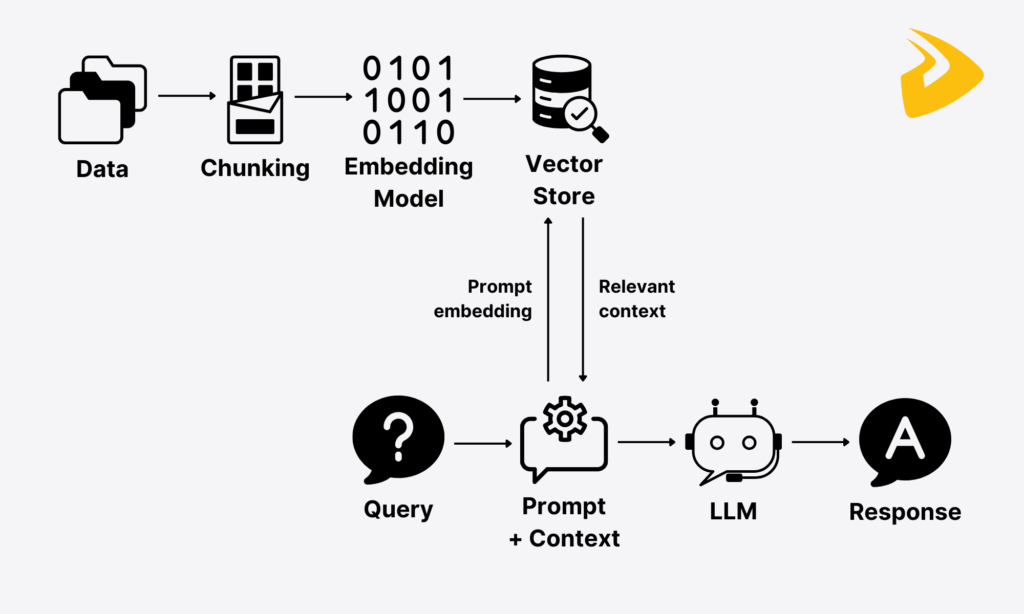
A standard Retrieval-Augmented Generation pipeline involves two phases:
- Indexing Phase (offline): Prepare your knowledge base
- Query Phase (online): Answer user questions using that knowledge base
Here are the 7 steps involved, end to end.
Step 1 – Data Ingestion & Chunking {#step-1}
The process starts with your private data – PDFs, Word documents, internal wikis, support tickets, financial reports, or product documentation.
Since LLMs have a limited context window (they can only read so much text at once), you cannot feed an entire 200-page manual into the model. The data must be broken into smaller, manageable pieces called chunks.
Why chunk size matters
- Too small (e.g., 50 tokens): Each chunk loses context. “The refund period is 30” – 30 what?
- Too large (e.g., 1000 tokens): Retrieval becomes noisy. You get irrelevant information mixed in.
- Sweet spot: 200 – 500 tokens with a small overlap (e.g., 50 tokens) between chunks to preserve context continuity.
Python Code: Load and Chunk a PDF
from langchain.document_loaders import PyPDFLoader
from langchain.text_splitter import RecursiveCharacterTextSplitter

# Load your document
loader = PyPDFLoader("company_policy.pdf")
documents = loader.load()

# Chunk it with overlap
splitter = RecursiveCharacterTextSplitter(
    chunk_size=500,       # Max tokens per chunk
    chunk_overlap=50,     # Overlap to preserve context
    length_function=len
)

chunks = splitter.split_documents(documents)
print(f"Total chunks created: {len(chunks)}")
# Output: Total chunks created: 147
Real-world tip: Always store the source file name and page number as metadata in each chunk. This lets you cite the source in your final answer — a critical feature for enterprise applications.
Step 2 – Creating Vector Embeddings {#step-2}
Once your text is chunked, each chunk must be converted into a vector embedding – a list of numbers that captures the semantic meaning of the text.
Think of it this way: the words “car” and “automobile” are completely different strings, but a good embedding model will place them very close together in mathematical space because they mean the same thing.
This is the magic that makes semantic search possible.
Popular Embedding Models
| Model | Provider | Best For |
| text-embedding-3-small | OpenAI | Fast, affordable production use |
| all-MiniLM-L6-v2 | HuggingFace | Free, open-source, local use |
| embed-english-v3.0 | Cohere | High accuracy, multilingual |
Python Code: Generate Embeddings
from langchain_openai import OpenAIEmbeddings

# Initialize the embedding model
embeddings = OpenAIEmbeddings(model="text-embedding-3-small")

# Generate an embedding for a single chunk
sample_text = "Our refund policy allows returns within 30 days of purchase."
vector = embeddings.embed_query(sample_text)

print(f"Embedding dimensions: {len(vector)}")
# Output: Embedding dimensions: 1536
Each chunk now has a 1536-dimensional fingerprint. Chunks with similar meaning will have vectors that are geometrically close to each other.
Step 3 – Storing in a Vector Database {#step-3}
You now have hundreds or thousands of embedding vectors. You need a place to store them so you can retrieve the most relevant ones at query time. That’s where a vector database comes in.
Popular choices include:
- Pinecone — Managed, production-ready, great for scale
- ChromaDB — Open-source, runs locally, perfect for prototyping
- Weaviate — Open-source with hybrid search support
- FAISS (by Meta) — Ultra-fast, runs in-memory, great for offline use
Python Code: Store Embeddings in ChromaDB
import chromadb
from chromadb.utils import embedding_functions

# Initialize ChromaDB client
client = chromadb.Client()

# Create a collection (like a table in a regular database)
openai_ef = embedding_functions.OpenAIEmbeddingFunction(
    api_key="your-api-key",
    model_name="text-embedding-3-small"
)

collection = client.create_collection(
    name="company_knowledge_base",
    embedding_function=openai_ef
)

# Store your chunks
for i, chunk in enumerate(chunks):
    collection.add(
        documents=[chunk.page_content],
        metadatas=[{"source": chunk.metadata.get("source", "unknown")}],
        ids=[f"chunk_{i}"]
    )

print("Knowledge base indexed successfully.")
Your knowledge base is now indexed and ready for lightning-fast semantic search
Step 4 – Query Processing {#step-4}
When a user types a question, the raw text cannot be directly compared to the stored vectors. The query must also be embedded using the exact same embedding model used during indexing.
# User asks a question
user_query = "What is your refund policy?"

# Convert the query to a vector
query_vector = embeddings.embed_query(user_query)
This gives us a vector that represents what the user is looking for — semantically, not just as a keyword match.
Step 5 — Retrieval (Finding the Right Context) {#step-5}
Now comes the actual “retrieval” part of Retrieval-Augmented Generation. The system searches the vector database for the top-K chunks whose embeddings are closest to the query embedding (measured using cosine similarity).
Python Code: Retrieve Top Relevant Chunks
# Search the vector database for the 3 most relevant chunks
results = collection.query(
    query_texts=[user_query],
    n_results=3  # Top 3 most relevant chunks
)

retrieved_chunks = results['documents'][0]

for i, chunk in enumerate(retrieved_chunks):
    print(f"\n--- Chunk {i+1} ---")
    print(chunk)
Sample Output:
--- Chunk 1 ---
Our refund policy allows returns within 30 days of purchase for all products...

--- Chunk 2 ---
For digital products, refunds are processed within 5-7 business days after approval...

--- Chunk 3 ---
Customers must contact support@company.com to initiate a refund request...
Step 6 — Prompt Construction {#step-6}
The retrieved chunks are now assembled into a structured prompt that tells the LLM exactly what context to use when answering.
# Build the final prompt
context = "\n\n".join(retrieved_chunks)

prompt = f"""You are a helpful customer support assistant for MlArticle.
Answer the user's question using ONLY the context provided below.
If the answer is not in the context, say "I don't have that information."

Context:
{context}

User Question: {user_query}

Answer:"""
Pro Tip: Always instruct the model to say “I don’t know” if the answer isn’t in the retrieved context. This eliminates hallucinations at the source.
Step 7 — LLM Response Generation {#step-7}
The final step: send the augmented prompt to the LLM and get a grounded, accurate response.
from openai import OpenAI

client = OpenAI(api_key="your-api-key")

response = client.chat.completions.create(
    model="gpt-4o-mini",
    messages=[
        {"role": "user", "content": prompt}
    ],
    temperature=0.1  # Low temperature = more factual, less creative
)

answer = response.choices[0].message.content
print(answer)
Output:
Our refund policy allows returns within 30 days of purchase. For digital products,
refunds are processed within 5-7 business days after approval. To initiate a refund,
please contact our support team at support@company.com.
No hallucination. No outdated information. Just a precise, grounded answer pulled directly from your own documents.
4. Real-World Use Cases of RAG {#use-cases}
Retrieval-Augmented Generation is not just a research toy — it is powering real production applications across industries:
Customer Support Bots — Companies like Intercom and Zendesk use RAG to let AI answer support tickets using only the company’s own help documentation.
Legal Research Tools — Law firms build RAG systems over thousands of case files, letting lawyers query past judgments in plain English.
Medical Knowledge Bases — Hospitals use RAG over clinical guidelines and research papers to assist doctors with evidence-based recommendations.
Internal Enterprise Search — Instead of digging through Confluence or Notion, employees simply ask questions in natural language and get direct answers.
Financial Analysis — Hedge funds and banks use RAG over earnings reports and SEC filings to answer analyst questions instantly.
5. Common Mistakes to Avoid {#mistakes}
Building a RAG pipeline is straightforward — but several common pitfalls can silently kill its accuracy:
Using mismatched embedding models — If you index with text-embedding-3-small but query with a different model, the vectors are incomparable. The retrieval will fail silently. Always use the same model for both indexing and querying.
Skipping chunk overlap — Without overlap, a key sentence that falls on a chunk boundary gets split in half. Always add 10–15% overlap between chunks.
Retrieving too few or too many chunks — Fetching only 1 chunk misses related context. Fetching 10 chunks floods the prompt and increases cost. Start with 3–5 and tune based on your use case.
Not filtering by metadata — If your knowledge base has documents from multiple departments, always filter by relevant metadata (e.g., department: "HR") before retrieval. This dramatically improves precision.
Setting temperature too high — For RAG applications, set temperature=0 or 0.1. Higher values cause the model to “get creative” and deviate from the retrieved facts.
6. Final Thoughts {#final-thoughts}
At the start of this article, I promised you that you’d leave knowing exactly how Retrieval-Augmented Generation works and how to build it yourself. Let’s make sure that promise was kept.
You now know:
- Why RAG exists — to solve the hallucination and knowledge-cutoff problems in LLMs
- The 7-step pipeline — from data ingestion and chunking, through embedding and vector storage, to retrieval, prompt construction, and LLM generation
- Real, working Python code — that you can copy, adapt, and run in your own projects
- Production-grade best practices — chunk overlap, metadata filtering, temperature control, and model consistency
Retrieval-Augmented Generation is one of the most important patterns in artificial intelligence engineering right now. Mastering it is not optional if you want to build AI applications that are actually reliable in the real world.
If you’re serious about going deeper, explore advanced topics like HyDE (Hypothetical Document Embeddings), re-ranking with cross-encoders, and agentic RAG – where the model decides whether to retrieve or not based on the query type.
Stay updated with us at mlarticle.com — we publish deep-dive guides on machine learning, LLMs, and AI engineering every week. Subscribe to our newsletter so you never miss the next one.
Have questions or want to share what you built? Drop a comment below — we read and respond to every one.